

This article contains affiliate links. We may earn a commission if you buy through our links, at no extra cost to you.
Best Tenkeyless Mechanical Keyboard in 2026
The tenkeyless layout is the most practical mechanical keyboard format for the majority of desk workers — and most people who try one never go back to full-size. Removing the numpad brings your mouse 4-5 inches closer to your keyboard’s home position, which reduces shoulder rotation and arm extension during every single mouse movement you make across an 8-hour day. For anyone who types more than they enter numbers, the tenkeyless mechanical keyboard is the obvious choice that the full-size market has somehow convinced people to ignore.
After researching and comparing dozens of tenkeyless mechanical keyboards across every price point — budget plastic boards to premium aluminum builds — here is what actually works for home office professionals and power users in 2026. If you’re also considering accessories to complete your setup, our guide to the best desk mat for home office covers everything you need to unify your workspace.
Quick Answer
The Keychron V3 is the best tenkeyless mechanical keyboard for most people — gasket-mounted construction, hot-swappable switches, QMK/VIA support, and a $95 price point that undercuts competing keyboards with the same build quality. For wireless, the Keychron K8 Pro adds Bluetooth 5.1 and three-device pairing without sacrificing Mac/Windows compatibility. Users who know their switches and want the best stock typing feel should look at the Leopold FC750R. Keycap enthusiasts should consider the Ducky One 3 TKL. Budget buyers can start with the Redragon K552.
Why Tenkeyless Is the Right Layout for Most Desk Workers
The numpad argument is straightforward: if you’re not doing accounting, data entry, or spreadsheet work that requires constant number input, the numpad is wasted space that pushes your mouse further from your body than it needs to be.
The distance your mouse travels from its resting position to your keyboard’s home row is a function of how far right the numpad pushes the main keyboard body. On a full-size keyboard, that distance is approximately 6-7 inches from the right side of the keyboard to the mouse. On a tenkeyless, it’s 2-3 inches. Multiply that difference across every mouse movement in an 8-hour workday — thousands of movements — and the cumulative shoulder rotation and arm extension adds up to real fatigue.
The counterintuitive point: most people who think they need a numpad don’t actually use it frequently enough to justify the ergonomic tradeoff. Track your numpad usage for a week — most home office workers find they use it for fewer than 20 inputs per day, which is easily handled by the number row. The people who genuinely need a numpad are doing specialized data entry work; everyone else is keeping it out of habit.
For context on which switch type suits your typing style before committing to a TKL board, see our guide on how to choose a mechanical keyboard switch — the TKL layout decision and the switch decision are independent choices worth making separately.
What Separates Good TKL Keyboards from Great Ones
Tenkeyless mechanical keyboards span a wider quality range than almost any other peripheral category — from $30 budget boards to $300 custom aluminum builds. The specs that actually differentiate meaningful quality tiers are fewer than the marketing suggests.
Mounting style is the most impactful build quality variable that most buyers overlook. Tray-mounted keyboards — the most common type at budget price points — screw the PCB directly to the bottom of the case, which transmits typing vibration directly through the plastic and produces a sharper, harder sound and feel. Gasket-mounted keyboards sandwich the PCB in a silicone or foam layer between the top and bottom case halves, absorbing vibration and producing a softer, more cushioned typing experience that sounds and feels significantly more premium. The Keychron V3 at $95 has a gasket mount; most keyboards at double the price use tray mounting.
Hot-swap capability determines whether your keyboard evolves with you or becomes obsolete when you want to try different switches. Soldered keyboards lock you into the switches you bought. Hot-swappable keyboards let you pull any switch and replace it in 30 seconds with no tools beyond a switch puller. For a $80-100+ investment, hot-swap protects the value of the purchase over 3-5 years.
QMK/VIA firmware support enables complete key remapping that runs on the keyboard itself — not in background software on your computer. Every key, every layer, every macro stored in the keyboard’s memory and active regardless of which computer you’re connected to.
The 5 Best Tenkeyless Mechanical Keyboards in 2026
1. Keychron V3 — Best Overall TKL (~$95)

The Keychron V3 redefines what $95 buys in a tenkeyless mechanical keyboard. Gasket-mounted construction with an aluminum top case, hot-swappable south-facing PCB, QMK/VIA firmware support, and pre-lubed Keychron switches that are noticeably smoother out of the box than the stock switches on boards costing $50 more.
The gasket mount at this price is genuinely remarkable — most keyboards with comparable construction cost $150-200. Keychron achieved it by selling direct and keeping retail margins out of the equation. The typing feel is softer and more cushioned than any tray-mounted board regardless of price, which makes long typing sessions significantly more comfortable.
Available in fully assembled form with Keychron’s own switches, or as a barebones kit without switches and keycaps for users who want to build from scratch. The south-facing RGB LEDs shine through the keycap legends evenly without the hot-spot issues that north-facing LEDs produce with certain keycap profiles.
Pros: Gasket mount at $95, QMK/VIA, hot-swappable, pre-lubed switches, aluminum top case, south-facing RGB, dual-mode Mac/Windows compatibility. Cons: Wired only, QMK setup requires some technical comfort, heavier than plastic TKL boards at 1.3kg.
2. Keychron K8 Pro — Best Wireless TKL (~$100-110)
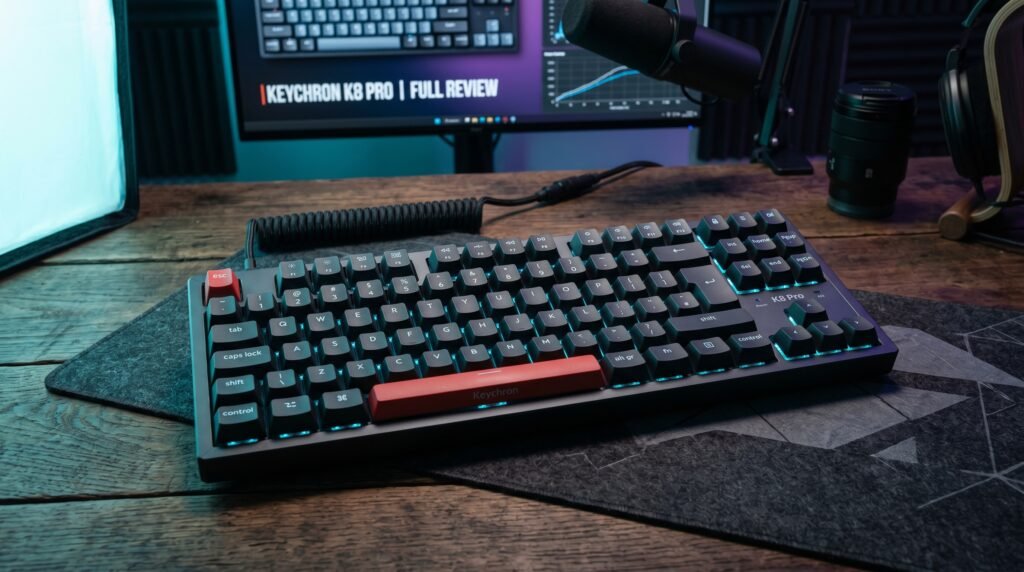
The Keychron K8 Pro is the wireless version of the Keychron TKL lineup — Bluetooth 5.1 with three-device pairing, 2.4GHz USB receiver option, hot-swappable switches, and Mac/Windows dual layout compatibility in a standard TKL form factor.
Battery life runs approximately 300 hours with backlighting off — roughly six weeks of full workday use before needing a charge via USB-C. Bluetooth reconnection from sleep is sub-2 seconds on both Windows and macOS — a meaningful spec for wireless keyboards that gets glossed over in most reviews. The K8 Pro’s Bluetooth 5.1 holds connection reliably through typical office Bluetooth congestion without the dropout issues that affect cheaper Bluetooth keyboards.
Best for: Home office workers who want wireless TKL with reliable Mac and Windows compatibility and hot-swappable switches.
Pros: Bluetooth 5.1 with three-device pairing, 2.4GHz option, hot-swappable, 300-hour battery without backlighting, Mac and Windows keycaps included, USB-C charging. Cons: Plastic case versus V3’s aluminum top, Keychron launcher only for remapping (no QMK), RGB reduces battery life substantially.
3. Leopold FC750R — Best for Typing Feel Without Hot-Swap (~$110-130)

The Leopold FC750R is the keyboard for people who’ve chosen their switches and want the most refined stock typing experience available without custom modifications. Leopold’s keyboards are soldered — no hot-swap — but the build quality, case dampening, and switch-to-PCB fit tolerances are tighter than any hot-swappable board at this price.
Leopold uses PBT doubleshot keycaps as standard — thicker than the ABS keycaps on most competitors, more resistant to shine over time, and with a texture that feels more premium under prolonged daily use. The sound profile on the FC750R is deeper and more consistent than most hot-swappable boards because the tighter tolerances eliminate the subtle wobble that hot-swap sockets introduce.
Best for: Users who’ve decided on their switches and want the best possible stock typing experience, or anyone upgrading from a membrane keyboard who wants Cherry MX reliability.
Pros: Superior stock typing feel, PBT doubleshot keycaps standard, deep consistent sound profile, compact dense build quality, Cherry MX switches, multiple colorways. Cons: Soldered only — no hot-swap, no wireless option, no RGB on most models, less community support than Keychron.
4. Ducky One 3 TKL — Best for Keycap Enthusiasts (~$120-140)

The Ducky One 3 TKL is built around hot-swap and designed specifically for users who plan to change keycaps frequently. The PCB uses a multi-layout design that accommodates different keycap configurations — split backspace, split right shift, ISO and ANSI layouts — making it the most versatile tenkeyless PCB available at this price for users who buy aftermarket keycap sets.
Ducky’s software-free RGB customization — all lighting effects and macros programmed directly through key combinations without installing anything — makes it the cleanest setup experience on this list for users who don’t want background processes running during work. The QUACK Mechanics sound dampening system (internal foam layers and silicone bottom) produces a quieter, more dampened typing experience than the bare PCB most competitors at this price offer.
Best for: Users who buy aftermarket keycap sets regularly and want the most compatible TKL PCB, or anyone who prefers software-free keyboard configuration.
Pros: Multi-layout PCB for keycap flexibility, software-free configuration, QUACK Mechanics sound dampening, hot-swappable, PBT tripleshot keycaps, strong build quality. Cons: $120-140 harder to justify vs. V3 for most users, less Mac-friendly out of the box than Keychron, availability varies by region.
5. Redragon K552 — Best Budget TKL (~$35-45)
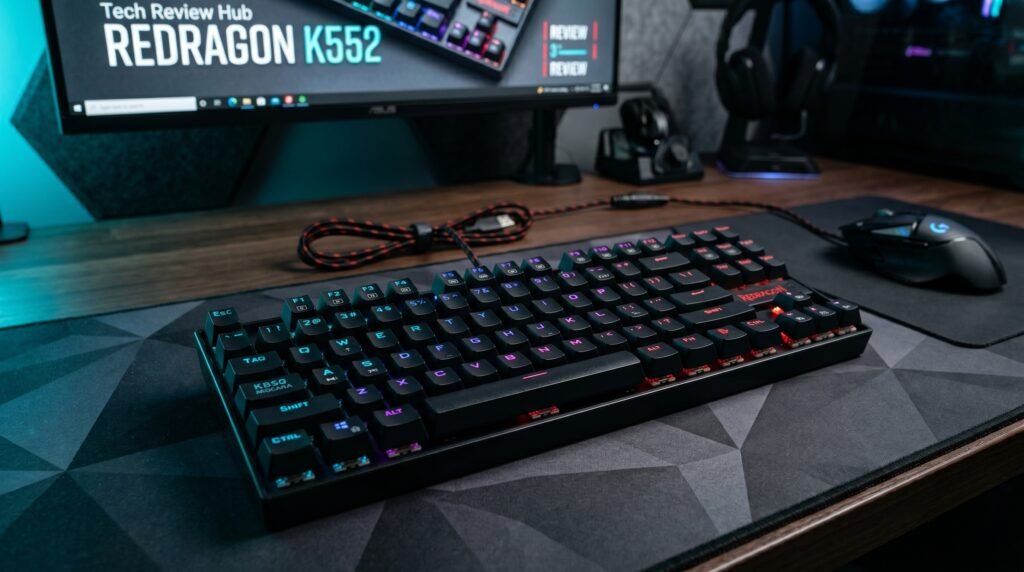
The Redragon K552 is the recommendation for anyone who wants to experience tenkeyless mechanical keyboards before committing to a $90-130 board. Tray-mounted metal construction, Redragon’s own mechanical switches in red, brown, or blue variants, and a price that makes the entry cost essentially zero relative to what a quality TKL costs.
The honest assessment: it’s a budget keyboard that types like a budget keyboard. The switches are louder and wobblier than Gateron or Cherry equivalents. The keycaps are ABS and will develop shine within 3-6 months of daily use. What most reviews won’t tell you is that for a user who’s never typed on a mechanical keyboard before, the K552 still produces a noticeably better typing experience than any membrane keyboard — the mechanical feedback is present and satisfying even through the budget build quality.
Best for: First-time mechanical keyboard buyers testing TKL before committing $90+ to a quality board.
Pros: Under $45, genuinely mechanical switches, TKL layout correctly executed, metal frame, RGB backlighting, anti-ghosting, widely available. Cons: Budget build quality throughout, ABS keycaps shine quickly, tray mount produces harder sound profile, Redragon switches inferior to Cherry/Gateron/Kailh equivalents, no hot-swap.
Comparison Table
| Product | Price | Best For | Rating |
|---|---|---|---|
| Keychron V3 | ~$95 | Best overall TKL build quality | 9.5/10 |
| Keychron K8 Pro | ~$100-110 | Best wireless TKL | 9/10 |
| Leopold FC750R | ~$110-130 | Best stock typing feel | 8.5/10 |
| Ducky One 3 TKL | ~$120-140 | Best for keycap enthusiasts | 8.5/10 |
| Redragon K552 | ~$35-45 | Best budget entry point | 7/10 |
What to Look for When Choosing a Tenkeyless Mechanical Keyboard
1. Mounting style over brand name Gasket mounting produces a meaningfully better typing experience than tray mounting — softer impact, better sound, less vibration fatigue during long sessions. At the same price point, a gasket-mounted keyboard from a lesser-known brand will almost always feel better than a tray-mounted keyboard from a well-marketed brand. Check the mounting style specification before checking anything else.
2. Hot-swap if you’re not certain about switches Switch preference is personal and often changes after the first few months of daily mechanical keyboard use. A user who buys Browns and decides they prefer Reds can swap every switch in a hot-swappable board for under $20 in new switches. The same change on a soldered board requires desoldering 87 switches — a two-hour job for an experienced person and a genuine PCB risk for anyone else.
3. Wireless only if your workflow requires it Wireless adds cost, thickness, and weight, and reduces the maximum polling rate compared to wired. For a desktop keyboard that sits in a fixed position connected to a fixed computer, wired is the better technical choice. Wireless justifies itself for keyboards that move between desk and lap, connect to multiple devices throughout the day, or need cable-free desk aesthetics.
4. Keycap compatibility for long-term ownership Standard TKL layouts accept any keycap set designed for ANSI TKL — the largest and most affordable segment of the aftermarket keycap market. Non-standard bottom rows — common on budget boards — restrict your keycap options to sets that specifically accommodate that layout. Check the spacebar size and bottom row layout before buying if aftermarket keycaps are part of your plan.
5. Firmware and remapping approach QMK/VIA runs on the keyboard itself — remapping survives across any computer you connect to. Proprietary software remapping only works when that software is running on the connected computer. For users who connect to multiple computers, QMK/VIA support is worth prioritizing specifically.
FAQ
Is tenkeyless better than full-size for home office use?
For most home office workers, yes. The primary advantage is mouse positioning — removing the numpad brings your mouse 4-5 inches closer to your keyboard’s center, reducing shoulder extension and arm travel during every mouse movement across the workday. The tradeoff is numpad access, which the number row handles adequately for the majority of users who aren’t doing constant numerical data entry.
What’s the difference between TKL and 75% keyboard layouts?
Both remove the numpad, but 75% keyboards additionally compress the navigation cluster and function row to eliminate gaps between key groups, reducing total width by another 10-15%. TKL keyboards keep the standard spacing between the function row, main alphanumeric area, and navigation cluster — the layout feels identical to a full-size keyboard minus the numpad. 75% boards are more compact but require adjusting to the tighter key groupings.
Are tenkeyless mechanical keyboards good for gaming?
Yes — TKL is actually the most popular layout among competitive PC gamers specifically because the shorter distance to the mouse reduces arm movement during play. The format originated in the gaming community before home office users adopted it for ergonomic reasons. Switch preference differs between gaming and typing — linear switches are generally preferred for gaming, while tactile switches suit typing-heavy work — but the TKL layout itself is equally suited to both.
How long do mechanical keyboards last compared to membrane keyboards?
Quality mechanical switches are rated for 50-100 million keystrokes per switch. At 8 hours of typing per day, that translates to 10-20+ years of daily use before switches begin to fail. Membrane keyboards typically last 5-10 million keystrokes. The difference in longevity is one of the legitimate justifications for the mechanical price premium — a $100 mechanical keyboard used daily for 10 years costs less per year than a $30 membrane keyboard replaced every 2-3 years.
Our Final Verdict
The best tenkeyless mechanical keyboard in 2026 is the Keychron V3 for most users — gasket mount, hot-swap, QMK/VIA, and aluminum construction at $95 that undercuts the competition at every comparable spec. If wireless is non-negotiable, the Keychron K8 Pro adds Bluetooth 5.1 for $10-15 more with minimal tradeoffs. Users who’ve decided on their switches and want the best possible stock typing feel should look at the Leopold FC750R — the tighter build tolerances produce a more refined experience than any hot-swappable board at the same price. Start with the V3 and work up from there only if you have a specific reason to. Check current pricing on Amazon for all five keyboards in this guide.