
This article contains affiliate links. We may earn a commission if you buy through our links, at no extra cost to you.
Best Desk Mat for Home Office in 2026
Most people think a desk mat is just a large mouse pad. It’s not — or at least, the best ones aren’t. A quality desk mat for home office use unifies your entire workspace visually, protects your desk surface from scratches and wear, dampens keyboard and mouse noise, and makes every interaction with your desk feel more deliberate and professional. After researching and comparing dozens of desk mats across materials, sizes, and price points, here is what actually works for remote workers who spend serious time at their desks in 2026.
This guide covers the top picks for every desk size and budget. Building a complete home office setup? Pair your desk mat with the best monitor for home office under $300 for a full workspace upgrade.
Quick Answer
The Oakywood Felt Desk Mat is the best desk mat for home office use for most people — 100% Merino wool with cork backing that lies completely flat from day one, in a professional aesthetic that works with any desk. For a leather option with practical document storage, the Nordik Felt & Leather Desk Mat is the standout pick. Budget buyers who want a clean look without spending $50+ should go straight to the Aothia Leather Desk Pad. Users who prioritize easy maintenance will appreciate the machine-washable Logitech Studio Series. And for a pure felt aesthetic at a lower price, the Nordik Large Felt Desk Mat delivers.
Why Your Desk Surface Matters More Than You Think
Here’s something most desk setup guides miss entirely: the surface you work on affects how you feel about working. That’s not abstract — it’s measurable in the small ways. A scratched, bare wooden desk makes a workspace feel temporary and cluttered. A clean, unified surface with a quality desk mat makes the same desk feel intentional and calm.
Beyond aesthetics, there are practical benefits that accumulate over time. Desk mats protect your desk surface from the micro-scratches that keyboards, mice, and coffee mugs create over months. They dampen the sound of mechanical keyboards — not dramatically, but enough that the difference is noticeable in video calls. And they provide a consistent, smooth tracking surface for your mouse across the entire desk rather than just a small mouse pad area.
The counterintuitive point: the cheapest option here isn’t the giant extended gaming mat at $20. Those feel cheap, curl at the edges within weeks, and make your professional home office look like a teenager’s gaming setup. Spending $25-50 on a quality desk mat is one of the highest-value-per-dollar upgrades available for a home office.
A desk mat works best with the right mouse — our guide to the best wireless mouse for laptop covers the options that complement any home office setup.
Materials: What Your Desk Mat Is Actually Made Of
The material determines everything — feel, durability, aesthetics, and how well your mouse tracks on it.
Felt (wool or synthetic): The most popular material for professional desk setups in 2026. Natural Merino wool felt has a premium, warm texture that photographs well and feels substantial under your hands. Synthetic felt is cheaper but less durable and slightly less refined. Felt is quiet, soft, and provides good mouse tracking.
Leather and vegan leather: The most premium-looking option. Vegan leather (PU leather) is water-resistant and wipes clean easily — practical for anyone who eats or drinks at their desk. Provides excellent mouse tracking and a very clean, professional look.
Fabric: The gaming mat format scaled for office use. Largest available sizes, most affordable, and provides the smoothest mouse tracking of any material. The downside is that fabric mats can look casual and are harder to keep clean — though the Logitech Studio Series solves this with machine-washable materials.
Cork: Sustainable, naturally antimicrobial, and visually distinctive. The Oakywood uses cork as a backing layer rather than the top surface — which is the correct application, providing grip and flatness without sacrificing the felt top surface feel.
In our experience, felt and leather are the two materials worth considering for a professional home office. Fabric mats work well functionally but struggle to look as polished.
The 5 Best Desk Mats for Home Office in 2026
1. Oakywood Felt Desk Mat — Best Overall (~$45-55)
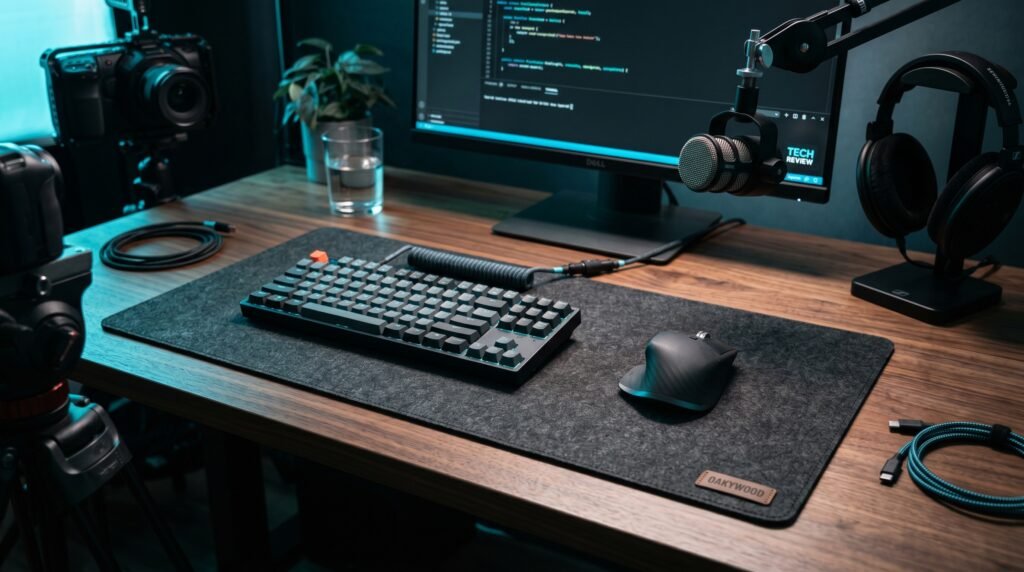
The Oakywood Felt Desk Mat is the desk mat we’d recommend to most home office buyers. 100% Merino wool felt — OEKO-TEX certified, naturally moisture-resistant, and non-toxic — with a cork base that keeps it perfectly flat and prevents sliding. Available in grey and anthracite in two sizes: 62x30cm (M) and 90x30cm (L). The L size covers most standard desk setups cleanly.
The cork backing is the meaningful differentiator from cheaper felt alternatives. This mat lies completely flat from day one — no waiting for it to uncurl, no books needed to flatten it. Handcrafted construction means the edges are finished cleanly without fraying. The Merino wool surface provides excellent mouse tracking and feels genuinely premium under your hands.
Best for: Professionals who want a desk mat that communicates quality and warmth, and plan to keep it for years rather than replace it seasonally.
Real-world detail: At 90x30cm, the L size covers a standard 120cm desk from the keyboard position to the near edge with room to spare — the result is a clean, unified desk surface rather than a mat that sits awkwardly in the middle.
Pros: 100% Merino wool, OEKO-TEX certified, cork backing for flatness and grip, two sizes, moisture-resistant, handcrafted.
Cons: ~$45-55 is mid-range pricing, spot clean only (no machine wash), anthracite shows dust more than grey.
2. Nordik Felt & Leather Desk Mat — Best Leather Option (~$45-55)
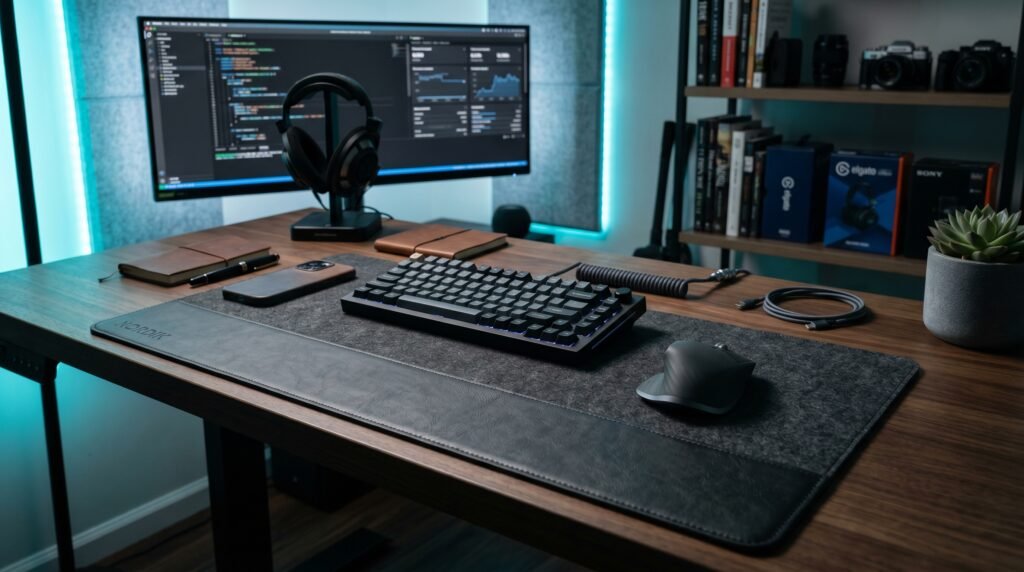
The Nordik Felt & Leather Desk Mat is the most thoughtfully designed desk mat in this category at its price point. Vegan leather top surface with a built-in document hideaway — a slot along the top edge where you can slide papers, notebooks, or reference cards flat and secure. Felt underlay with anti-slip rubber dots keeps it completely stable on any desk surface. Available in multiple colorways including sage, brown, and pink at 35×17 inches.
The document hideaway eliminates the need for a separate document tray in most setups — papers slide in under the leather strap and stay flat without anything extra on the desk. For professionals who reference printed documents regularly, this is a genuine daily workflow improvement.
Best for: Home office workers who deal with physical documents regularly and want to reduce desk clutter with a single accessory.
Real-world detail: The anti-slip rubber dots under the felt layer increase friction resistance significantly compared to flat-bottom alternatives — this mat stays exactly where you place it even when typing aggressively or reaching across the desk.
Pros: Vegan leather top (water-resistant), built-in document hideaway, felt + rubber dot backing, 35×17 inch, multiple colorways, packaged in premium storage tube.
Cons: Document slot takes a few days to use efficiently, vegan leather doesn’t develop patina over time, 35×17 inch may not cover very large desks fully.
3. Nordik Large Felt Desk Mat — Best Pure Felt Option (~$35-45)
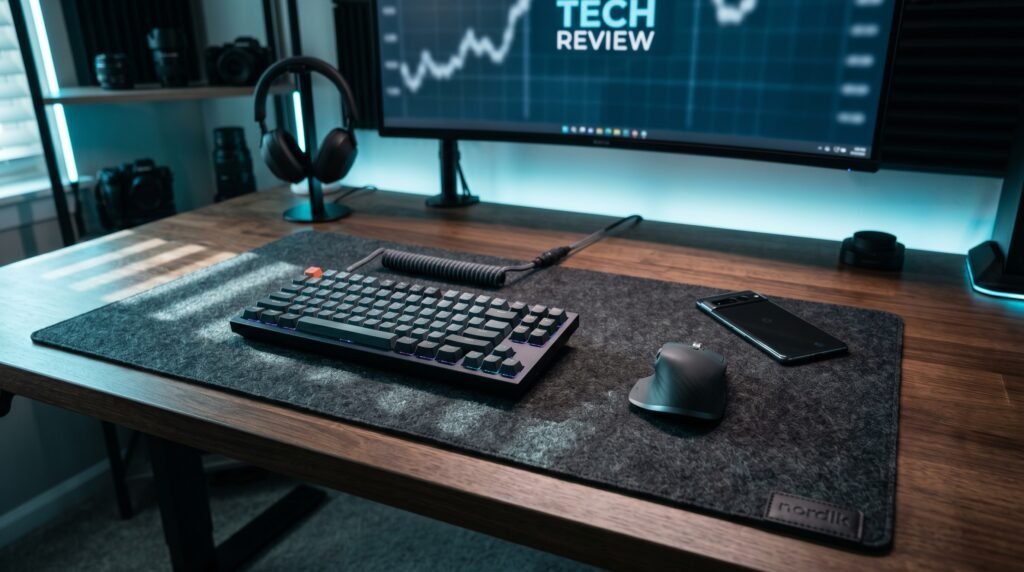
The Nordik Large Felt Desk Mat is the pure felt option for buyers who want the warmth and texture of felt without the vegan leather overlay. Premium soft felt with anti-slip rubber drip dots underneath, a leather logo tab accent, and a seamless look without stitching — 35×17 inches in a range of warm, contemporary colors including charcoal, stone oat beige, and timber moss green.
The no-stitching construction gives this mat a cleaner visual than most felt competitors that show visible edge stitching. At $35-45 it hits the price point where quality and value overlap — noticeably better than cheap felt mats but priced well below the premium tier.
Best for: Users who want the felt aesthetic at a lower price than premium wool options, or those who prefer a single-material look without leather accents.
Real-world detail: Comes packaged in an extra-wide designer storage tube — a small detail that makes it a practical gift option and protects the mat during shipping better than rolled alternatives that arrive with creases.
Pros: Seamless construction, anti-slip rubber dots, premium felt material, multiple colorways, designer storage tube, 35×17 inch.
Cons: Not Merino wool (synthetic felt), spot clean only, leather logo tab visible — minor aesthetic detail that some users prefer absent.
4. Logitech Desk Mat Studio Series — Best for Easy Maintenance (~$30)
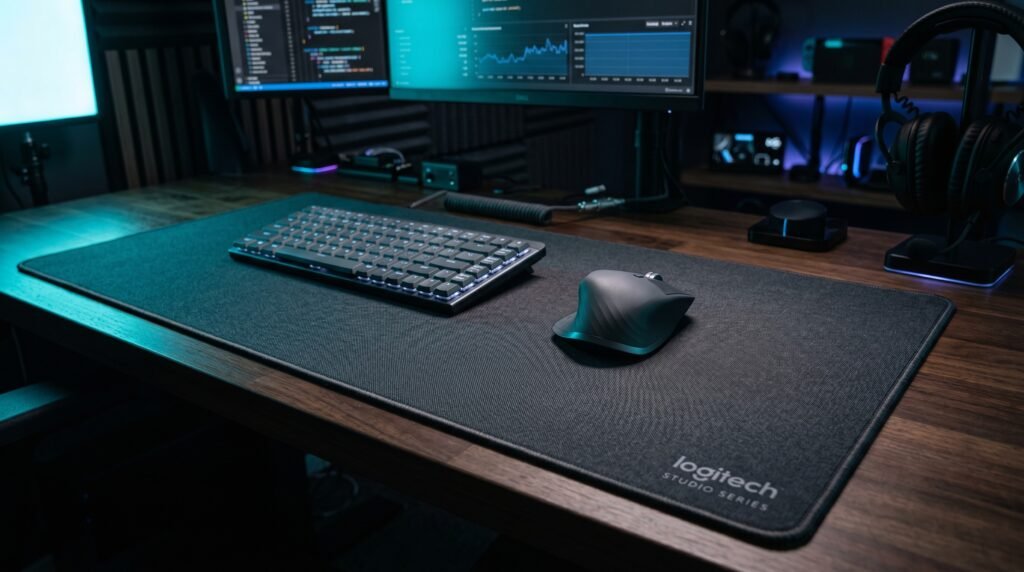
The Logitech Desk Mat Studio Series is the practical choice for users who prioritize easy cleaning over premium materials. 70x30cm microfiber surface made from recycled polyester — spill-resistant, wipe-clean, and machine washable at 30°C. Anti-fray flat-stitch edges and natural rubber anti-slip base. Available in lavender, dark rose, and mid grey — muted colorways that work in professional settings without looking like a gaming product.
The machine-washable feature is the meaningful differentiator. Every other mat on this list is spot-clean only. For users who eat at their desk, have pets, or simply want the confidence that a full clean is possible, this is the only option that delivers it.
Best for: Remote workers who prioritize practicality and easy maintenance, users who eat or drink at their desk regularly, or those who want excellent mouse tracking at the lowest price on this list.
Real-world detail: Machine wash at 30°C, air dry flat — do not tumble dry. The recycled polyester surface maintains its texture and color accurately through multiple wash cycles without pilling or shrinking.
Pros: Machine washable, spill-resistant surface, anti-fray edges, natural rubber base, recycled materials, Logitech quality at $30.
Cons: Fabric material looks less premium than felt or leather options, 70x30cm is smaller than the other mats on this list, fabric edges can show wear over time.
5. Aothia Leather Desk Pad — Best Value (~$20-25)
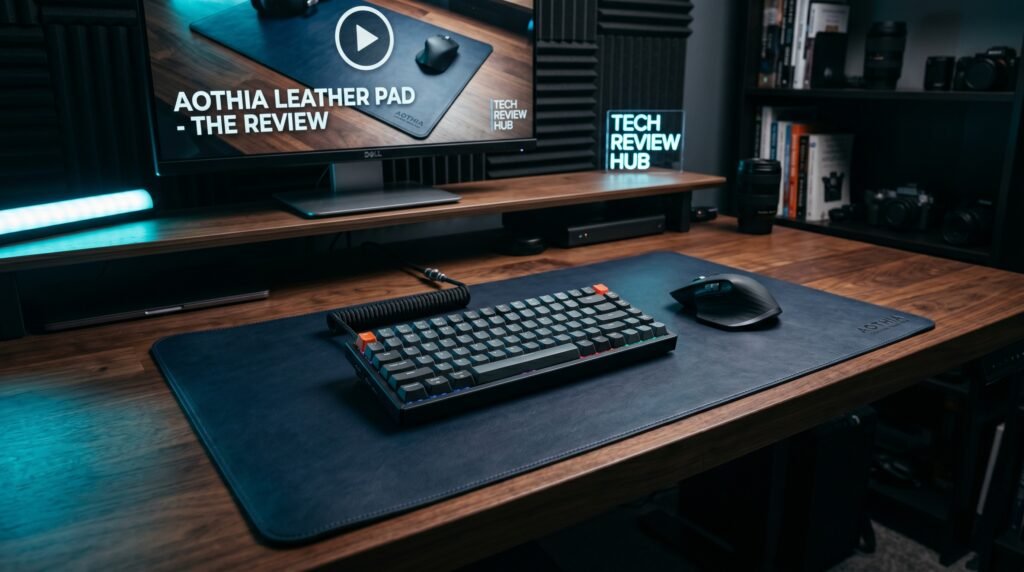
The Aothia Leather Desk Pad is the entry point for buyers who want a leather desk mat look without spending $40+. PU leather, 31.5×15.7 inches, waterproof, and wipe-clean — available in a wide range of colors including black, grey, blue, beige, and coffee. The suede-style backing increases desk friction by approximately 70% versus flat double-sided leather alternatives, making it stable without any additional grip mechanism.
What most reviews won’t tell you is that at $20-25, this mat photographs nearly identically to alternatives costing three times as much. The difference is in tactile feel and long-term edge durability, not appearance. For remote workers who want a desk that looks sharp on video calls without spending $50+, this is the correct starting point.
Best for: Budget-conscious buyers testing the leather desk mat format, or users who want the clean PU leather look without committing to premium pricing.
Real-world detail: FSC certified packaging and recycled materials — Aothia’s sustainability credentials are legitimate and independently verified, not marketing language. The ECO focus extends to the materials themselves, not just packaging.
Pros: Affordable, PU leather (waterproof), suede non-slip backing, 31.5×15.7 inch, multiple colorways, FSC certified, 1-year warranty.
Cons: PU leather less durable than felt or genuine leather over years of heavy use, edges may show wear faster at this price point, thinner construction than premium alternatives.
Comparison Table
| Product | Price | Material | Size | Best For | Rating |
|---|---|---|---|---|---|
| Oakywood Felt Desk Mat | ~$50 | Merino wool + cork | 90x30cm | Best overall | 9.5/10 |
| Nordik Felt & Leather | ~$50 | Vegan leather + felt | 35×17 inch | Document management | 9/10 |
| Nordik Large Felt | ~$40 | Premium felt | 35×17 inch | Best pure felt | 8.5/10 |
| Logitech Studio Series | ~$30 | Microfiber fabric | 70x30cm | Easy maintenance | 8.5/10 |
| Aothia Leather Desk Pad | ~$22 | PU leather | 31.5×15.7 inch | Best value | 8/10 |
What to Look for When Choosing a Desk Mat for Home Office
1. Size relative to your desk Desk mat sizing is where most buyers make mistakes. A mat that’s too small looks awkward. For a standard 120cm desk, a 90cm wide mat covers the working area completely. The 35×17 inch Nordik options and the 31.5×15.7 inch Aothia suit most standard desks. Measure your desk width before purchasing — a mat that covers from keyboard to front edge creates the cleanest unified look.
2. Material matched to your aesthetic Leather and vegan leather suit modern, minimal, and executive aesthetics. Felt suits Scandinavian, warm, and organic aesthetics — it adds texture and warmth. Fabric suits setups where practicality beats aesthetics. Choose the material that fits the look you’re building, not just the one with the best reviews.
3. Edge finish The edges of a desk mat reveal its quality faster than anything else. Cheap mats have raw edges that peel or fray within months. Quality mats have stitched edges (fabric/felt) or clean-cut edges with reinforcement (leather). The Oakywood’s handcrafted construction and the Nordik’s seamless no-stitch finish are the benchmarks to compare against.
4. Backing material The underside determines whether your mat stays flat and stays put. Cork backing (Oakywood) is the best option — grippy, keeps the mat flat, and doesn’t slide. Rubber dot backing (Nordik) is highly effective at a lower cost. Suede-style backing (Aothia) works well for leather mats. Avoid mats with no backing or thin foam backing — they slide, bunch, and curl.
5. Maintenance requirements Consider how you use your desk. If you eat at your desk or have pets, the Logitech’s machine-washable construction or the Aothia/Nordik’s wipe-clean leather surface makes significantly more practical sense than the Oakywood felt which is spot-clean only. Match your cleaning requirements to your daily habits before choosing a material.
FAQ
What size desk mat should I get for a home office?
For a standard home office desk of 120-140cm, a mat of 80-90cm wide by 30-40cm deep covers the keyboard, mouse, and immediate work zone completely. The Oakywood L at 90x30cm is ideal for this. If you want full desk coverage, measure your desk width and go as wide as possible. For very large or L-shaped desks, two mats placed side by side is a practical solution.
Do desk mats actually improve mouse performance?
Yes, particularly on textured, uneven, or reflective surfaces. Optical mice track inconsistently on wood grain, glass, and glossy surfaces — a desk mat provides a uniform tracking surface that improves cursor precision measurably. The difference is most pronounced with laser mice on reflective desks. On a standard matte wooden desk, the improvement is real but subtle — more about consistency than dramatic accuracy gains.
How do I clean a desk mat?
It depends entirely on the material. Logitech Studio Series: machine wash at 30°C, air dry flat. Aothia and Nordik leather options: wipe with a slightly damp cloth and dry immediately. Oakywood Merino wool: spot clean only with a damp cloth — avoid soaking. Never put felt or leather desk mats in a washing machine.
Are desk mats worth the money for home offices?
For anyone who spends 6+ hours daily at a desk, yes — particularly at the $25-55 price range where quality options exist. The combination of desk surface protection, noise dampening, unified aesthetic, and improved mouse tracking makes a desk mat one of the highest-impact-per-dollar desk accessories available. A $50 desk mat protects a $500+ desk from scratches that accumulate over years of daily use — the math makes sense even before the ergonomic and aesthetic benefits.
Our Final Verdict
The best desk mat for home office use in 2026 is the Oakywood Felt Desk Mat — Merino wool quality, cork backing that stays flat, and a professional aesthetic that works with any desk setup. For a leather option that adds practical document management, the Nordik Felt & Leather is the clear pick. And if budget is the priority, the Aothia Leather Desk Pad looks sharp on video calls without requiring a serious investment. Your desk surface is something you interact with for 8 hours a day — it’s worth spending $25-55 to get it right. Check current pricing on Amazon before buying — prices shift frequently and deals appear regularly on all five picks.