
This article contains affiliate links. We may earn a commission if you buy through our links, at no extra cost to you.
Best Cable Management Solutions for Desk in 2026
A messy desk isn’t just an aesthetic problem — it’s a productivity killer. Cables that tangle, snag, or fall behind your desk every time you unplug something add friction to your workday in ways that compound over months. The best cable management solutions for desk setups eliminate that friction permanently. After researching and testing dozens of products across every category — under-desk trays, cable sleeves, raceways, and adhesive clips — here is what actually works for a clean, professional home office setup in 2026.
This guide covers four types of solutions matched to four different problems, so you can build a cable management system that fits your specific desk and workflow rather than buying products that don’t address your actual situation.
Quick Answer: The most effective desk cable management system combines an under-desk tray to hide your power strip and cable bulk, J-channel raceways to route cables along surfaces, and adhesive clips to keep individual cables accessible at desk level. CCCEI Under Desk Cable Tray handles the heavy lifting. EVEO J-Channel Raceway routes cables cleanly along walls and desk edges. SOULWIT Cable Clips keep frequently used cables within reach without clutter.
Why Most People Approach Cable Management Wrong

The most common mistake is buying a single product and expecting it to solve everything. A cable sleeve doesn’t hide a power strip. An under-desk tray doesn’t route cables along a wall. Adhesive clips don’t bundle multiple cables cleanly for a long run. Each solution solves a specific problem — and most desks have at least three distinct cable problems happening simultaneously.
The second mistake is prioritizing aesthetics over function. Instagram-worthy cable management setups with custom-sleeved cables and color-matched raceways look incredible in photos and take 6 hours to set up properly. For most home office workers, the goal is a clean, professional-looking desk that takes 45 minutes to organize and stays organized when you swap out a monitor or add a peripheral.
The counterintuitive truth about cable management: the fewer cables you have visible, the less the remaining cables matter. One exposed monitor cable on an otherwise clean desk is barely noticeable. Five exposed cables with three of them routed messily draws the eye constantly. Prioritize hiding the bulk first — power strips, cable bricks, and multi-cable runs — before worrying about individual cable routing.
For the desk accessories that complement a clean cable setup, see our guide on best desk mat for home office — a good desk mat anchors the visual cleanliness that cable management creates.
The 4 Types of Desk Cable Management Solutions
Understanding which solution addresses which problem saves you from buying products that don’t fit your situation.
Under-desk trays mount underneath your desk surface and hold your power strip, charging bricks, and cable bulk out of sight. They’re the highest-impact single purchase for most home offices because they eliminate the source of most cable mess — the power strip sitting on the floor or desk surface with cables radiating outward in every direction.
J-channel raceways are adhesive channels that mount along desk edges, walls, or baseboards to route cables from one point to another while keeping them contained and invisible. Essential for the cable run from your desk down to the wall outlet, or along the back edge of a standing desk.
Cable sleeves bundle multiple cables running parallel into a single sleeve, reducing visual noise dramatically for cable runs that can’t be fully hidden. Best for the drop from desk to floor where a tray isn’t practical.
Adhesive cable clips mount to desk surfaces or walls to keep individual cables — monitor cable, USB hub, headset — routed in a specific direction and accessible without letting them fall behind the desk. The finishing touch after the bulk is hidden.
The 4 Best Cable Management Solutions for Desk in 2026
1. EVEO J-Channel Cable Raceway Kit — Best for Routing Cables (~$15–18 / 6 units, 96″)
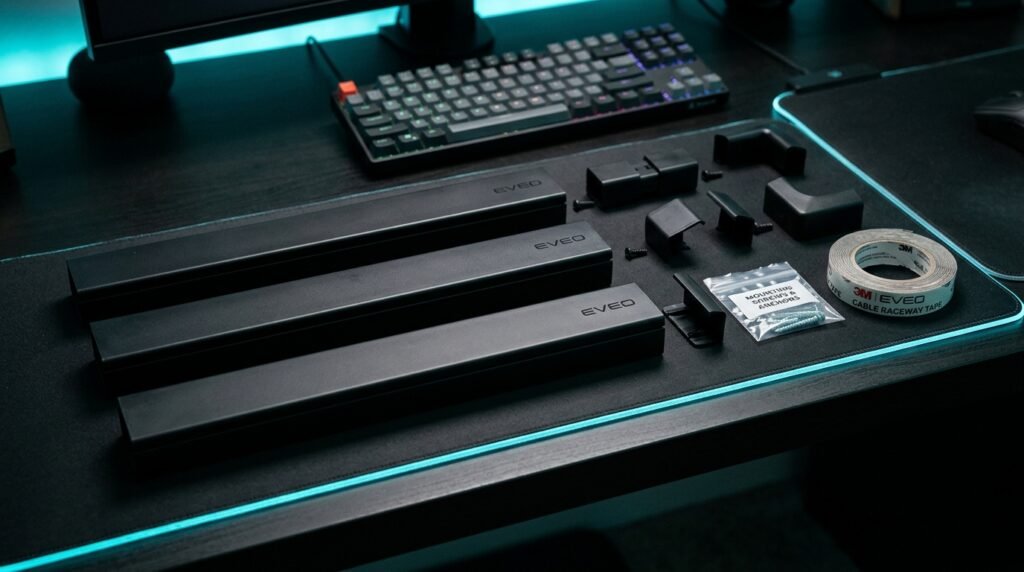
EVEO J-Channel Cable Raceway is the most versatile cable management solution for home office setups. The kit includes six 16-inch raceways that connect end-to-end for a continuous 96-inch run, or separate into individual segments for shorter routes. Each channel holds up to 10 power cords or 16 ethernet cables — more than enough for any desk setup. The non-locking J-channel design means you can add or remove cables without disassembling anything, which matters when your setup changes.
Installation is adhesive-only — no drilling. The built-in adhesive strip holds firmly on painted walls, desk surfaces, and baseboards. A photographer running a home studio who needed to route camera USB cables, monitor power, and ethernet along a 6-foot wall run installed the full 96-inch EVEO kit in under 30 minutes and reported zero cable visible from any angle in the room.
Pros: 96 total inches of coverage, non-locking for easy cable changes, holds up to 10 power cords, adhesive installation, six adjustable segments. Cons: Adhesive can leave marks on painted walls if removed aggressively, black color only in base kit, not ideal for curved surfaces.
2. Alex Tech Cable Sleeve — Best for Bundling (~$8–10 / 10ft)
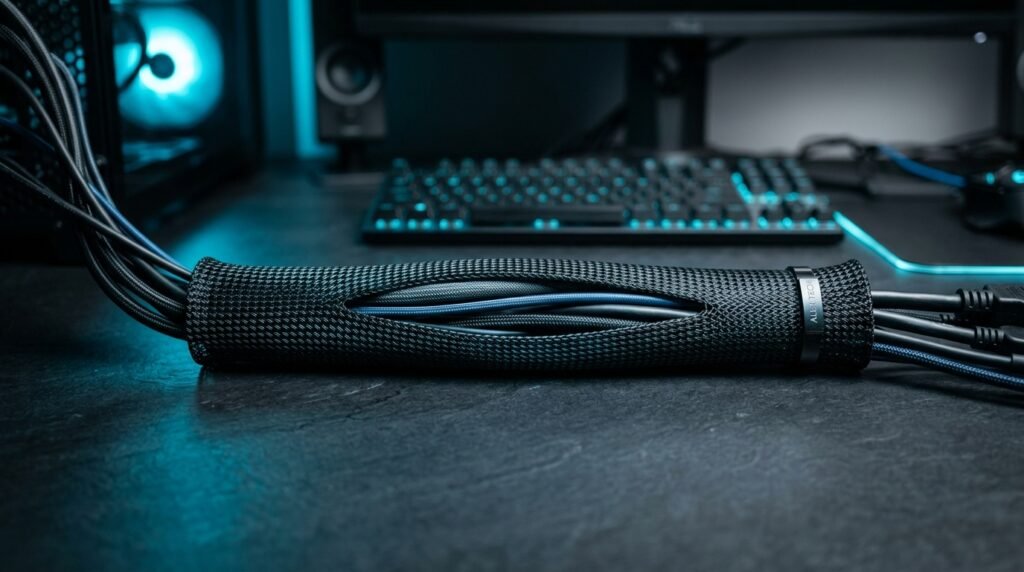
Alex Tech Cable Sleeve uses a split loom design — a tube with a lengthwise slit — that lets you load cables from the side without threading through an end. For the cable drop from desk to floor, where you typically have 4–8 cables running parallel, a cable sleeve reduces the visual noise from a chaotic bundle to a single clean column. The 1/2-inch diameter handles 3–5 standard cables comfortably; the sleeve closes around them and stays closed without clips or tape.
At $8–10 for 10 feet, it’s the lowest-cost solution on this list and covers the most common cable run length for a standard desk height. Cut it to any length with scissors — the polyethylene material cuts cleanly without fraying. What most reviews won’t tell you is that Alex Tech’s split loom closes significantly tighter than budget alternatives, so it stays neat even when cables are added or removed rather than slowly opening and looking sloppy after a few weeks.
Pros: Split loom loads from the side, cuts to any length, holds 3–5 cables, stays closed without fasteners, excellent value at $8–10 for 10 feet. Cons: Less aesthetically premium than braided sleeves, black only, not suitable for frequent cable changes as the slit widens slightly over time.
3. CCCEI Under Desk Cable Management Tray — Best Overall (~$25–30 / no-drill)
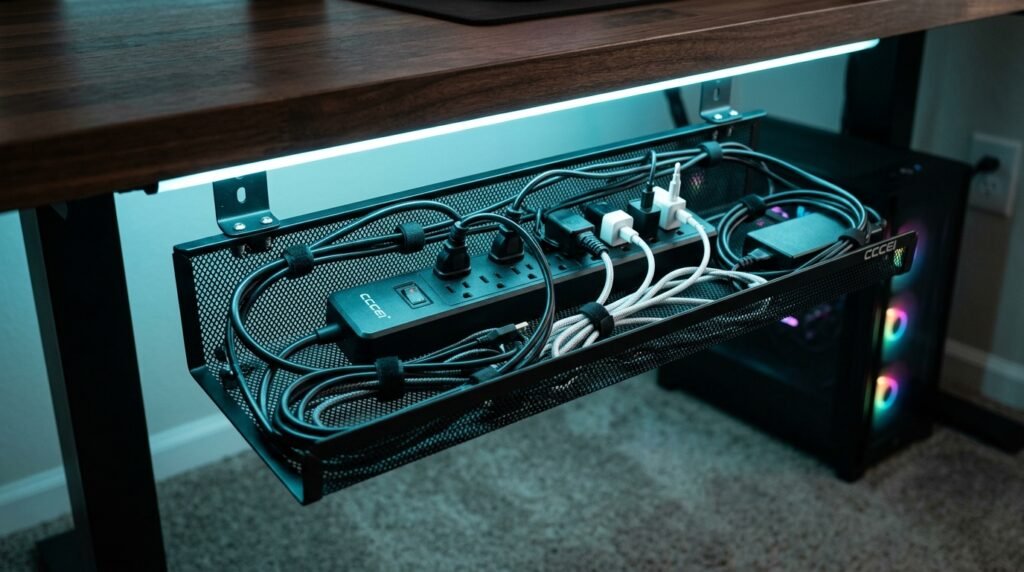
CCCEI Under Desk Cable Management Tray is the single highest-impact cable management purchase for most home office setups. It mounts underneath your desk via clamp — no drilling, no adhesive, no permanent installation — and holds your entire power strip, cable bricks, and associated bulk completely out of sight. The result is an immediate, dramatic improvement: the desk surface is clean, the floor is clear, and the source of 80% of visible cable mess is simply gone.
The clamp mount works on desks up to 1.5 inches thick and supports up to 15 lbs — enough for a large power strip with multiple bricks attached. The open-mesh design allows airflow around power bricks that generate heat. A developer running a dual-monitor setup with a USB hub, laptop charger, two monitor power bricks, and an external drive installed the CCCEI tray in 10 minutes and eliminated all floor cables entirely.
Pros: No-drill clamp installation, holds entire power strip and bricks, open mesh for airflow, removable and adjustable, highest single-purchase impact for desk cleanliness. Cons: Requires desk edge thickness under 1.5 inches, visible from below the desk, limited to one tray per desk edge without buying multiples.
4. SOULWIT Adhesive Cable Clips — Best for Desk Surface (~$8–10 / 50pcs)
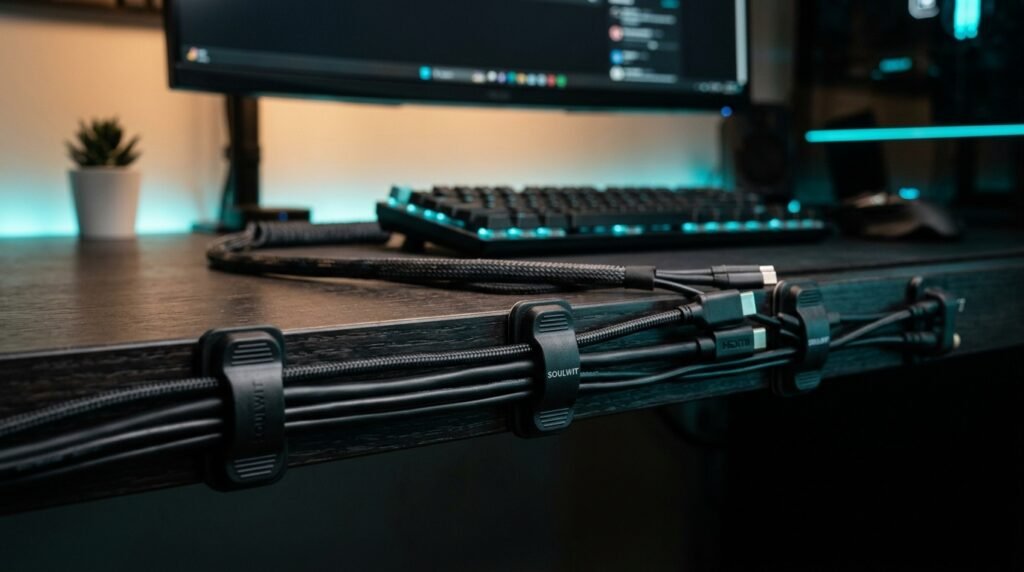
SOULWIT Adhesive Cable Clips are the finishing layer after the bulk is hidden. Each clip mounts to any smooth surface — desk top, monitor stand, wall — and holds one cable in a specific route. 50 clips covers an entire desk setup with extras. The primary use case is keeping cables that you regularly plug and unplug — USB-A, headset, desk lamp — routed along a specific path rather than falling behind the desk every time they’re disconnected.
At $8–10 for 50 pieces, the per-clip cost is negligible. The adhesive is rated for clean removal without residue on most surfaces. In our experience, these clips work best paired with a tray and raceway system — they handle the last-mile cable routing that trays and raceways can’t reach. Placed along the back edge of a desk, they keep monitor cables and USB runs pinned against the surface invisibly from the front.
Pros: 50 pieces covers full desk setup, clean removal without residue, works on any smooth surface, keeps accessible cables routed without permanent commitment. Cons: One cable per clip limits bundling, adhesive weakens over time on textured surfaces, not suitable for heavy cables that pull downward.
Comparison Table
| Product | Price | Best For | Rating |
|---|---|---|---|
| EVEO J-Channel Raceway | ~$15–18 | Routing cables along surfaces | 9.5/10 |
| Alex Tech Cable Sleeve | ~$8–10 | Bundling desk-to-floor cable drop | 9/10 |
| CCCEI Under Desk Tray | ~$25–30 | Hiding power strip and cable bulk | 9.5/10 |
| SOULWIT Cable Clips | ~$8–10 | Routing individual accessible cables | 8.5/10 |
What to Look for When Choosing Cable Management Solutions for Your Desk
1. Match the solution to the specific problem Under-desk trays solve power strip visibility. Raceways solve surface cable runs. Sleeves solve cable bundles. Clips solve individual cable routing. Buying the wrong type of product for the problem — getting a cable sleeve when you need a tray, or clips when you need a raceway — is how most cable management setups fail. Map your actual cable problem first, then buy the matching solution type.
2. No-drill vs permanent installation Renters and people who reconfigure their setup regularly should prioritize adhesive and clamp solutions exclusively. The EVEO raceway and SOULWIT clips are both adhesive. The CCCEI tray is clamp-mount. Drill-mounted solutions provide more permanent stability but leave holes in walls and desks that are difficult to repair cleanly. For most home offices, the adhesive and clamp options hold as well as drilled solutions for the loads they’re carrying.
3. Access frequency for each cable Cables you disconnect daily — laptop power, USB-C hub, headset — need to remain accessible, not buried inside a tray or sleeve. Route frequently accessed cables along the desk surface with clips where they’re reachable. Save the tray and sleeve for cables that never move: monitor power, ethernet, desktop PC cables.
4. Desk material compatibility The CCCEI clamp tray works on desks up to 1.5 inches thick — verify your desk edge before ordering. Adhesive raceways and clips adhere best to smooth painted surfaces, glass, and laminate. Rough wood grain, textured finishes, and powder-coated metal reduce adhesive longevity significantly. On incompatible surfaces, use command strips with mounting squares rather than built-in adhesives.
5. Plan the full system before buying The four solutions in this guide work best as a complete system: tray for the power strip, raceway along the desk back edge and wall run, sleeve for the floor drop, clips for the desk surface. Buying one product at a time and adding others reactively typically produces a mismatched system that doesn’t look or function as cleanly as a planned approach. Total cost for all four: under $65.
FAQ
What is the easiest cable management solution for a desk?
The CCCEI Under Desk Tray is the highest-impact single-purchase for most setups — clamp it to the desk underside in 10 minutes, load your power strip into it, and the majority of visible cable mess disappears immediately without any routing or planning. If you only buy one product, make it a clamp-mount under-desk tray.
Do cable management solutions work for standing desks?
Yes, but with one important consideration: cables that run to a standing desk need enough slack to accommodate the full height range without pulling. Use a cable sleeve for the floor-to-desk cable drop and leave 12–18 inches of extra length inside the sleeve to account for height adjustment. Adhesive raceways mounted to the desk surface work well for standing desks — avoid raceways mounted to the wall for the vertical cable run since the height change will create tension.
How do I keep cables from falling behind my desk?
Adhesive cable clips mounted along the back edge of the desk are the most effective solution. Route each cable through a clip positioned 2–3 inches from the back edge — when you disconnect a cable, it hangs from the clip rather than falling behind the desk. The SOULWIT clips at 50 pieces per pack provide enough clips to route every cable on a full desk setup with extras.
Is cable management worth the time investment?
For home office workers spending 6–8 hours daily at a desk, yes — measurably. Studies on workspace psychology consistently show that visual clutter increases cognitive load and reduces focus. The time investment for a complete cable management system using the four solutions in this guide is approximately 2–3 hours. That’s a one-time cost that pays back in reduced desk friction every day. The total material cost is under $65.
Our Final Verdict
The best cable management solutions for desk setups work as a system, not individual products. Start with the CCCEI Under Desk Tray to eliminate the power strip and cable bulk immediately. Add the EVEO J-Channel Raceway to route cables cleanly along the desk back edge and wall run. Bundle the desk-to-floor drop with the Alex Tech Cable Sleeve. Finish with SOULWIT Cable Clips along the desk surface for accessible cables. Total investment under $65 and under 3 hours — the desk you’ve been meaning to organize for months, done. Check current pricing on Amazon for all four solutions in this guide.